Building a Nuxt.js app is the enjoyable part. Getting it onto a VPS and keeping it there is where a straightforward afternoon turns into a fight with systemd, nginx and a Node process that keeps dying.
Nuxt does not deploy the way a static site or a PHP app does. There is no folder of files you can simply drop into a web root. A Nuxt SSR build produces a Node server that you have to run, supervise, and put behind a reverse proxy, with the right Node version and the right environment variables in place. Miss one piece and the site is either down or serving a blank page.
The problem
A production Nuxt deployment has more moving parts than most tutorials admit. Even for a single small app you are on the hook for all of this:
- The right Node version on the server (via nvm, apt, or a distro package), matching what you built against
- Installing dependencies with your package manager of choice (
npm,pnpmoryarn) - Running
nuxt build, which produces a.output/directory containing a standalone Node server - Actually running that server (
node .output/server/index.mjs) and keeping it alive across crashes and reboots - A process manager (systemd or pm2) so the app restarts on failure and starts on boot
- An nginx reverse proxy in front of the Node port, because you do not expose port 3000 to the world
- Environment variables loaded for the service, not just your shell
- TLS, so the whole thing is served over HTTPS
None of these steps is hard on its own. The trouble is that they are all slightly different every time, and they only reveal their mistakes in production.
The pain
Here is how it actually goes wrong. You build locally on Node 22, the server has Node 18, and the app boots but throws at runtime on a syntax it does not recognise. Or the build succeeds, you run node .output/server/index.mjs in your SSH session, the site loads, you close the terminal, and the site dies with it. Or pm2 is running the app but never got told to resurrect on reboot, so the next server restart takes you offline until you notice.
Then there is nginx. The reverse proxy config has to point at the right port, forward the right headers, and handle websockets if you use them. Get a header wrong and Nuxt's hydration breaks in ways that look fine on the surface and fail on interaction. Every one of these is a small, forgettable detail, and the deployment is exactly the kind of task you run rarely enough to forget them all.
The traditional way: an honest sketch
Here is the shape of deploying a Nuxt SSR app to a fresh Ubuntu server by hand. This is deliberately an outline, not a paste-and-go recipe, because the point is how many distinct parts there are, not the exact incantation for each. Every line below expands into its own set of decisions and its own ways to get subtly wrong.
# 1. Install a Node runtime and PIN it to the version you built against
#    (nvm / apt / distro package all differ; a mismatch fails only at runtime)

# 2. Pull the code and install deps
pnpm install && pnpm build   # produces .output/ (a standalone Node server)

# 3. Run node .output/server/index.mjs under a process manager (systemd or pm2)
#    so it survives crashes AND reboots. This is where an SSH-session-only
#    process, or a pm2 that never got told to resurrect on boot, bites you.

# 4. Put an Nginx reverse proxy in front of the Node port
#    (this is where deep links, forwarded headers and websocket upgrade get
#    subtly wrong, and hydration breaks in ways that look fine until you click)

# 5. Load environment variables for the SERVICE, not just your shell,
#    then add TLS (certbot) so the whole thing serves over HTTPS
Each of those five comments hides real work: a full systemd unit (or pm2 config) with the correct ExecStart path and boot wiring, an Nginx server block with the right proxy_set_header lines and upgrade handling, an env file the service actually reads, and a certificate. None of it is individually hard. The problem is that it is half a dozen moving parts (runtime, build, process supervision, reverse proxy, environment, TLS) that have to line up at once, on a task you run rarely enough to forget the details, and most of the mistakes surface only in production.
Realistically this is an afternoon the first time, and still a careful half-hour of copy-checking every time after. A fully static site (nuxt generate) skips the Node service and proxy, but most real Nuxt apps run SSR, which is exactly the case with the fiddly, error-prone bits.
There is genuine value in understanding this pipeline once. There is very little value in reassembling it, from memory, on every deploy, and hoping you got the systemd ExecStart path and the Nginx headers right.
The StackPilot App workflow
StackPilot App is a local-first VPS Operations Platform. It runs on your machine, connects to your server over SSH, and turns that entire pipeline into a form and a Deploy button. The managed Node runtime, the process supervision, the reverse proxy and the environment are handled for you, and you watch every step stream live. Your credentials never leave your computer.
Here is the whole flow end to end before we break it down step by step:
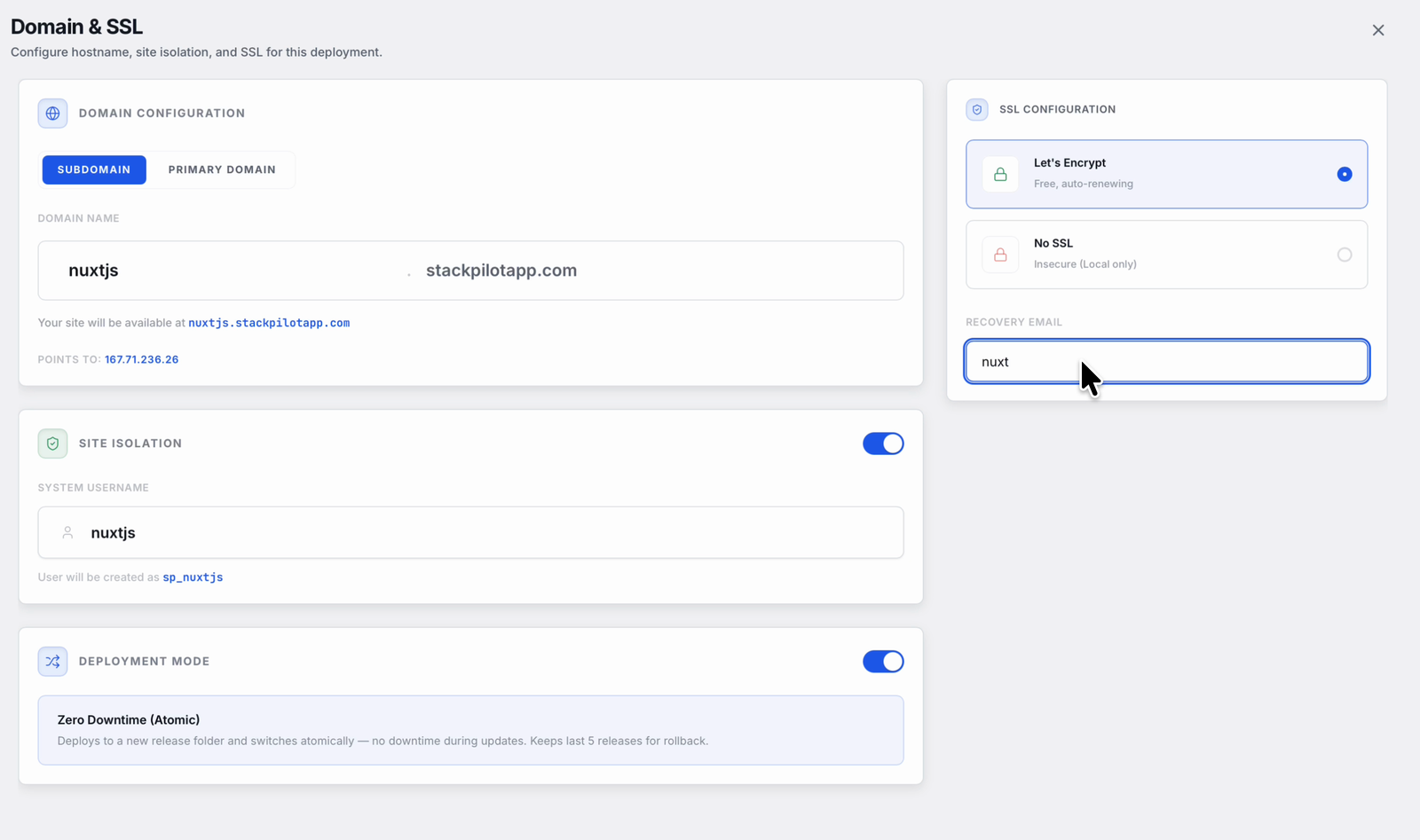
Every deploy runs through the same short wizard. You point StackPilot App at your repository, set the domain and SSL, and pick zero-downtime releases:
Step 1: Connect your repository
Create a new site in StackPilot App and point it at your Git repository. StackPilot App pulls the code onto your server over SSH and tracks the branch you nominate, so future deploys are a single click.
Step 2: Choose a Node site
Tell StackPilot App this is a Node app rather than a PHP one. It provisions the Node runtime on the server for you and pins the version, so the Node your build runs against matches the Node that serves it. No nvm dance, no version drift between your laptop and the box.
Step 3: Set your build command
Give StackPilot App your build command, typically pnpm install && pnpm build (or the npm/yarn equivalent). It runs this on the server after each pull, producing the .output/ directory exactly as you would locally.
Step 4: Set your start command
Point StackPilot App at the entry it should run, node .output/server/index.mjs. From there the Node process is supervised for you. It restarts on failure, comes back after a reboot, and its logs are captured, so there is no lingering SSH session holding your site up.
Step 5: Let the reverse proxy configure itself
StackPilot App writes the nginx server block that proxies your domain to the Node port, with the correct headers and websocket upgrade already in place. You do not hand-edit an nginx file or remember which proxy_set_header lines matter. Enable TLS with a click and certbot handles the certificate.
Step 6: Deploy
Hit Deploy and watch it run: pull, install, build, restart the supervised process, reload nginx. Every step streams live, so it is never a black box. A few minutes later your Nuxt app is serving over HTTPS, running as a managed service that will still be up after the next reboot.
Why this works
It is worth understanding what StackPilot App is actually doing, because it is the same pipeline you would build by hand, done consistently:
- A managed Node runtime. The Node version is pinned on the server and matched to your build, so "works on my machine" and "works on the server" stop being two different questions.
- Process supervision by default. The Node server runs as a supervised service, not in a terminal you have to keep open. It restarts on crash and survives reboots, so the app stays up without you babysitting it.
- The reverse proxy is generated, not hand-written. nginx is configured to forward to the Node port with the right headers and websocket support, which removes the class of bugs where hydration breaks because a header was missing.
- Atomic, repeatable releases. Each deploy pulls, installs, builds and swaps to the new release in a standardised order, with the logs streamed. Every deploy of every site runs the same way, so there are no snowflakes.
FAQ
Does StackPilot App support Nuxt SSR and static Nuxt?
Yes. For SSR you give it a build command and a start command (node .output/server/index.mjs), and it supervises the Node process behind an nginx proxy. For a statically generated site (nuxt generate), you can serve the pre-rendered output directly through nginx without a running Node service.
Do I need to install Node on the server myself? No. When you create a Node site, StackPilot App provisions and pins the Node runtime on the server for you, so the version you build against matches the version that serves the app.
How is the Nuxt process kept alive? StackPilot App runs your start command as a supervised service. It restarts the process on failure and brings it back after a reboot, and it captures the logs, so you are not relying on an open SSH session or a hand-written systemd unit.
Can I use pnpm or yarn instead of npm?
Yes. The build command is yours to set, so pnpm install && pnpm build, yarn, or plain npm all work. StackPilot App just runs what you give it on the server after each pull.
Where do my environment variables go? You set them in StackPilot App and they are loaded for the running service, not just your shell. That is the same distinction that trips people up in a manual systemd deployment, handled for you.
What operating systems does StackPilot App run on? macOS is generally available, and Windows is in public beta. It connects to any SSH-reachable Ubuntu or Debian VPS, from any provider, and can also provision a server for you on AWS, DigitalOcean or Vultr with one click.
Summary
Deploying a Nuxt.js app to a VPS by hand means assembling a Node runtime, a build step, a supervised process, an nginx reverse proxy, environment variables and TLS, and getting every one of them right on a task you run rarely. The pipeline is worth understanding once. It is not worth rebuilding from memory every deploy. With StackPilot App you connect your repository, pick a Node site, set your build and start commands, and deploy: the runtime is pinned, the process is supervised, the proxy configures itself, and every step streams live, with your credentials never leaving your machine.
Ready to deploy your own Nuxt app? Download StackPilot App or explore the features first.