Symfony is a pleasure to build with locally. Getting it onto a production VPS the first time is where the pleasure tends to run out.
Locally, symfony serve hides a great deal: the right PHP version and extensions, a web server pointed at exactly the right directory, the production environment, a compiled cache, applied migrations, and file permissions that let the web user write where it must. On a bare Ubuntu server, all of that becomes your job, and Symfony is unforgiving about getting any one of them wrong.
The problem
A production Symfony deployment is not one action. It is a short chain of steps, and the chain breaks silently if a link is out of order.
You need PHP with the extensions Symfony expects, Composer installed with production autoloading, the framework told it is running in prod (with a real APP_SECRET), the container and routes compiled into a warm cache, the database schema brought up to date, and the var/ directory writable by the web server. Then Nginx has to serve from public/, not the project root, and route every non-file request through the single index.php front controller. Miss the docroot and you leak your source. Miss the try_files rule and every route except the homepage returns a 404.
The pain
Get any of it slightly wrong and Symfony fails in ways that are hard to read:
- A blank white page, because
APP_ENVis stilldevand the error was swallowed, or becausevar/cacheis not writable bywww-data. - Working routes on the homepage and 404s everywhere else, because Nginx never learned the front-controller pattern.
- A
500that only appears after your first deploy, becausecomposer installpulled dev dependencies, or the cache was warmed for the wrong environment. - Migrations that ran on your laptop but never on the server, so the app boots against a schema that no longer matches the code.
None of these are exotic. They are the standard Symfony deployment mistakes, and each one costs an evening the first time you meet it.
The traditional way: an honest walkthrough
Deploying a Symfony app to a freshly provisioned Ubuntu server by hand is not one command, it is a dozen-odd discrete steps that have to run in the right order, every one of them a chance to get something subtly wrong. The outline below assumes PHP-FPM, Composer and Nginx are already installed, and it is deliberately abbreviated. Even so, look at how much has to line up.
# Get the code onto the server, then install prod dependencies:
git clone git@github.com:you/your-symfony-app.git /var/www/app && cd /var/www/app
composer install --no-dev --optimize-autoloader
# then: set APP_ENV=prod + a real APP_SECRET + DATABASE_URL, dump-env prod,
# run cache:clear and cache:warmup for prod,
# apply doctrine migrations, fix var/ permissions for www-data...
# ...plus an Nginx server block rooted at public/ with the index.php front
# controller + fastcgi_pass to PHP-FPM (this is where most people get it subtly
# wrong: leak source from the wrong docroot, or 404 every route without try_files),
# then certbot for TLS. Miss or misorder any one and the deploy is broken.
Every line of that is worth understanding. None of it is worth retyping, in the right order, on every single deploy, hoping you remembered composer dump-env prod, the chown on var/, and the exact fastcgi rules. It is a long, fiddly sequence, it takes real time to get right the first time, and the failure modes are quiet ones you only notice in production.
The StackPilot App workflow
StackPilot App is a local-first VPS Operations Platform. It runs on your machine, connects to your server over SSH, and turns that whole chain into a repeatable deploy you can run with one click. Your credentials never leave your computer, and there is no cloud control plane sitting between you and your server.
Here is the whole flow end to end before we break it into steps:
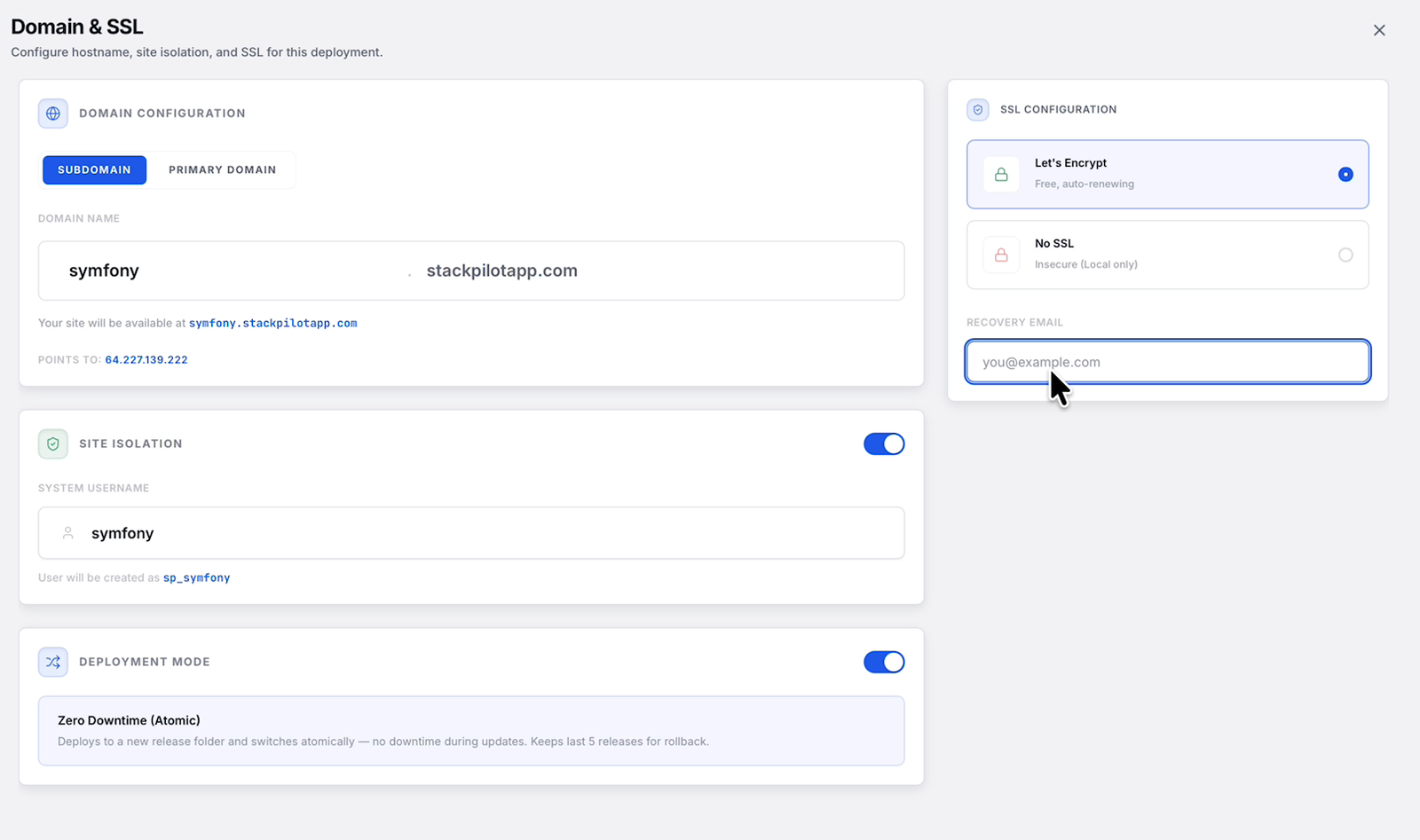
Every deploy runs through the same short wizard. You point StackPilot App at your repository, set the domain and SSL, and pick zero-downtime releases:
Step 1: Connect your Git repository
In StackPilot App, create a new site on your server and point it at your Symfony repository. Choose the branch you deploy from, and StackPilot App handles the clone and the deploy key. Your source lives on the server, not on any third-party build service.
Step 2: Create a PHP site rooted at public/
Symfony's one non-negotiable is the docroot. When you create the site, set the web root to the project's public/ directory. StackPilot App writes an Nginx server block with the correct Symfony front-controller rules, the try_files fallback to index.php, and PHP-FPM wired to the PHP version you selected. The docroot mistake that leaks source, and the missing try_files rule that 404s every route, are both handled for you.
Step 3: Define the deploy recipe
A deploy recipe is the ordered list of commands that run on every release. For a Symfony app it is exactly the chain from the manual section:
composer install --no-dev --optimize-autoloaderphp bin/console cache:clearandcache:warmupphp bin/console doctrine:migrations:migrate --no-interaction
You edit it once. It runs the same way every time, in the same order, so nothing gets skipped under pressure.
Step 4: Manage the production environment
Open the environment manager and set APP_ENV=prod, a real APP_SECRET, and your DATABASE_URL. StackPilot App keeps these values on the server as the app's environment, so there is no .env.local to forget and no secret accidentally committed to Git.
Step 5: Deploy and watch the logs live
Click Deploy. StackPilot App checks out the new release, runs the recipe, and streams every line of output to your machine as it happens. If Composer resolves, the cache warms and migrations apply, you see it. If a migration fails, you see that too, on the exact line it failed, rather than discovering it from a 500 in production.
Why this works
It is worth understanding what StackPilot App actually does, because it is the same deployment you would run by hand, made consistent:
- PHP-FPM is managed for you. The site runs on a real PHP-FPM pool with the version and extensions you chose, wired to Nginx correctly. No socket-path guesswork.
- The docroot and front controller are correct by construction. The server block roots at
public/and routes throughindex.php, so you never leak source and never lose routes to a 404. - The environment is deliberate.
APP_ENV=prod,APP_SECRETandDATABASE_URLare set once in the environment manager, not scattered across files you might forget to copy. - Releases are atomic and repeatable. Each deploy builds a fresh release and runs the same ordered recipe (install, cache, migrate), so a good deploy today is a good deploy next month.
FAQ
Do I need to install PHP and Composer first? The server needs PHP-FPM and Composer available. StackPilot App can provision a fresh Ubuntu or Debian VPS with your chosen PHP version, extensions and Composer as part of the base setup, then deploy the Symfony site on top.
How does StackPilot App handle Doctrine migrations?
Migrations run as a step in your deploy recipe (doctrine:migrations:migrate --no-interaction), so the schema is brought up to date on every release. Because the output streams live, a failing migration is visible immediately rather than surfacing as a runtime error later.
Where do APP_ENV and APP_SECRET live?
In the environment manager, stored as the site's environment on the server. You set APP_ENV=prod and a real APP_SECRET once. There is no .env.local to hand-copy and no secret in your Git history.
Does it set up the Nginx front controller correctly?
Yes. When the site is rooted at public/, StackPilot App generates the standard Symfony server block, including the try_files fallback to index.php and the PHP-FPM pass, so routes work beyond the homepage.
Can I add TLS? Yes. StackPilot App issues and renews Let's Encrypt certificates for the site, so production runs over HTTPS without a manual Certbot step per deploy.
What operating systems does StackPilot App run on? macOS is generally available, and Windows is in public beta.
Summary
Deploying Symfony to a VPS by hand is a short chain of steps that breaks silently when one link is wrong: production dependencies, the prod environment and APP_SECRET, a warm cache, applied migrations, writable var/, and an Nginx server block rooted at public/ with the front-controller pattern. The commands are worth understanding once. They are not worth retyping on every deploy. With StackPilot App you connect your repository, root the site at public/, define the deploy recipe once, set the production environment, and deploy while every step streams live, with your credentials never leaving your machine.
Ready to deploy your own Symfony app? Download StackPilot App or explore the features first.