Svelte compiles your components away. What you ship is a small bundle of plain JavaScript, CSS and an index.html, which makes a Svelte app one of the cheapest things you can possibly host. A modest VPS can serve it to a lot of visitors without breaking a sweat.
The catch is that "just static files" still needs a server that is set up properly. Something has to run the Vite build, Nginx has to serve the output with the right fallback for client-side routes, and the site has to be on HTTPS. Do that by hand a few times and the small details start to drift.
The problem
Hosting a Svelte app on your own server comes down to a short list that is easy to get slightly wrong:
- A Node runtime on the server to run the build, matching the version you develop with
- A package manager (
npm,pnpmoryarn) and a clean install of dependencies - The Vite production build, which writes the static output to
dist/ - An Nginx server block that points at the built files, not the source
- A fallback to
index.htmlso client-side routes do not 404 on refresh - Caching headers for the hashed assets, and TLS so the site runs on HTTPS
The pain
The first deploy usually looks fine. You open the homepage and everything renders. Then someone refreshes on an inner route, or follows a shared link to /settings, and Nginx returns a bare 404 because there is no file at that path. The build was correct; the server was never told to hand unknown paths to your app.
Other problems are quieter. A redeploy overwrites the live folder while the build is still running, so for a few seconds visitors get a mix of old and new files. A returning visitor gets a stale bundle because the cache headers were never set. The site stays on http:// because TLS was a "later" job. And with several sites on one server, they all run as the same user, so one compromised project can read the rest.
The traditional way: an honest sketch
Here is the shape of it on a fresh Ubuntu server. This is an outline, not a recipe to paste:
# 1. Install Node (and pnpm), pinned to the version you build with

# 2. Pull the code, install and build
pnpm install && pnpm build     # Vite writes static files to dist/

# 3. Write an Nginx server block rooted at dist/
#    with a try_files fallback to /index.html for client-side routes
#    ...plus cache headers for hashed assets

# 4. Issue a certificate with certbot and set up renewal
# ...and invent a release folder + symlink scheme if you want rollback
It is not a lot of commands. It is a lot of small decisions, and the mistakes only show up when a real visitor hits the wrong URL.
The StackPilot App workflow
StackPilot App is a desktop app that sets up and manages your own servers. It is not a hosting company: you bring your own VPS and pay your provider directly. It connects over SSH and turns the steps above into a short wizard, with the whole deploy streamed to a live log.
Here is a complete Svelte deploy:
Step 1: Pick the Svelte preset
In Sites, start a new deployment and pick the Svelte preset. It comes with Nginx, Node and a Vite build, already set up to work together.
Step 2: Choose your source
Select a repository from your Git provider to deploy your own code. To try it out first, skip the repository and StackPilot App scaffolds a fresh Svelte app.
Step 3: Domain, isolation and SSL
Set the domain or subdomain, then choose how the site runs:
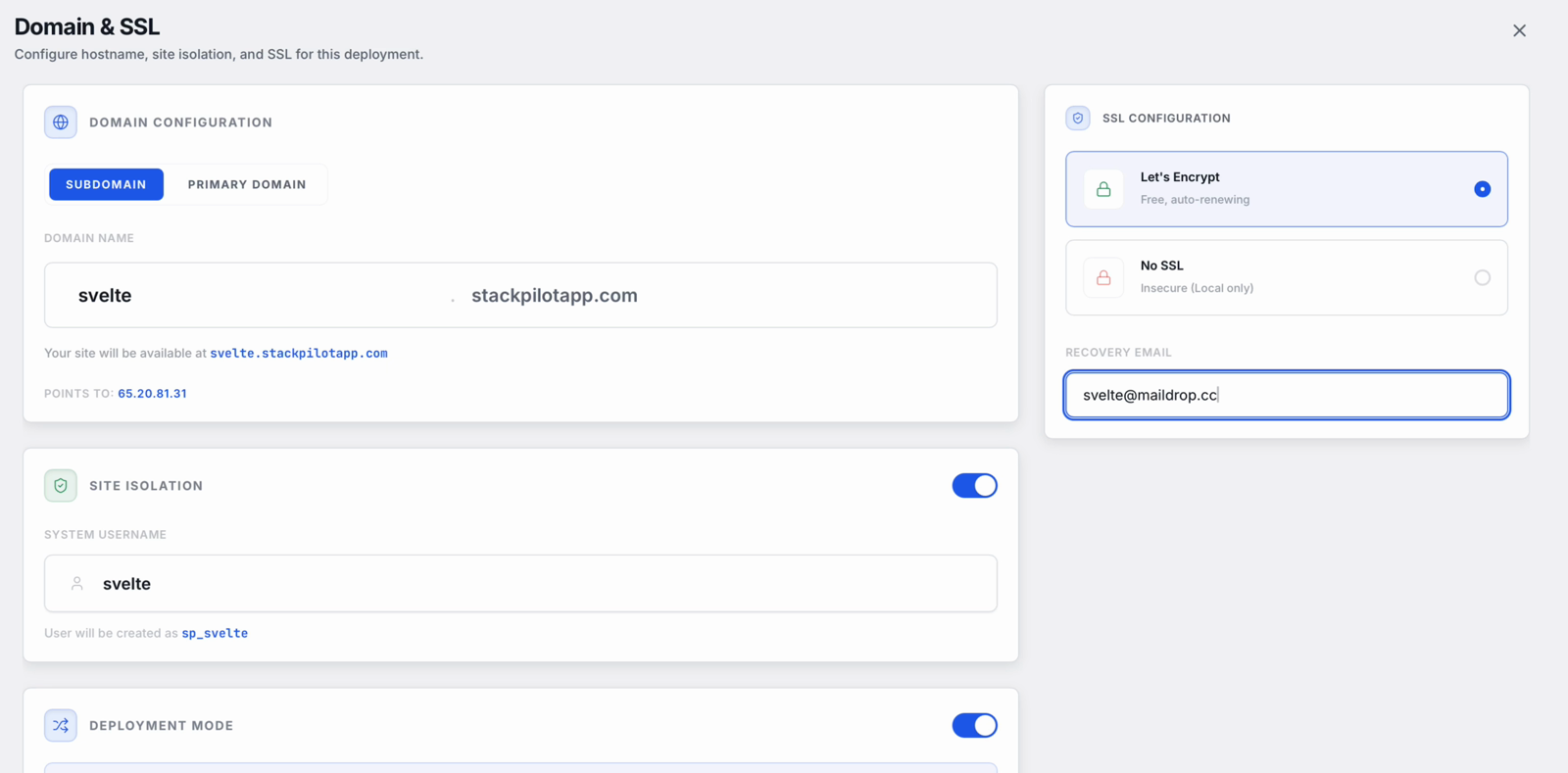
Site isolation gives the app its own Linux user. Zero downtime mode builds each release in its own folder and keeps the last five for rollback. Let's Encrypt gives you a free certificate that renews automatically.
Step 4: Node and package manager
Choose the Node version (Node 24 is the recommended default) and your package manager. The demo uses pnpm; npm and yarn work too.
Step 5: Review and deploy
Launch it and watch the log. StackPilot App creates the isolated user, sets up Node, installs dependencies, runs the Vite production build, and switches to the new release. Nginx is configured to serve the built files and the SSL certificate is issued. In the demo the whole deploy took well under a minute.
Step 6: It is live
The site page in StackPilot App shows the deployment history with one-click rollback. Open your domain and the Svelte app is live over HTTPS.
Why this works
- Nginx serves the build, not the source. The web root points at the built output, with routing handled for you.
- No Node process to babysit. A static Svelte build needs Node only to compile. After that, Nginx does all the serving, which keeps memory use low and leaves nothing to crash.
- Atomic releases. Each deploy builds in its own folder and switches over in one step, so visitors never see a half-written
dist/. Rollback is one click. - Isolation by default. Each site can run under its own Linux user.
- Your keys stay with you. The app runs on your machine and talks to your server over SSH.
FAQ
Do I need Node running on the server for a Svelte app? Only to build it. A static Svelte build is plain HTML, CSS and JavaScript, so once it is built Nginx serves it directly and no Node process stays running.
How much server do I need for Svelte? Very little. The build is light compared with frameworks like Next.js or Angular, and serving static files is cheap. The smallest plan at most VPS providers is enough for a typical Svelte app.
Can I use pnpm or yarn? Yes. Choose the package manager in the stack config step and StackPilot App installs and builds with it.
Will refreshing on a client-side route give me a 404? Not with the Svelte preset. Nginx is set up to serve the app for routes that do not match a file, so deep links and refreshes keep working.
Can I roll back a bad deploy? Yes. With zero downtime mode on, the last five releases are kept and you can roll back to any of them in one click.
Which servers does StackPilot App work with? Any SSH-reachable Ubuntu or Debian VPS, from any provider. It can also provision a server for you on AWS, DigitalOcean or Vultr. The app runs on macOS, and Windows is in public beta.
Summary
A Svelte app is about as easy to host as a web app gets, but a proper deploy still needs Node for the build, a correct Nginx setup with a routing fallback, caching, TLS and a safe way to release and roll back. With StackPilot App you pick the Svelte preset, set the domain and SSL, choose Node and your package manager, and deploy. It is live in under a minute, with every step in the log.
Ready to host Svelte on your own server? Download StackPilot App, or see the Vue guide if you also run Vite-based Vue apps.